Effortless Theme Testing for Web Developers
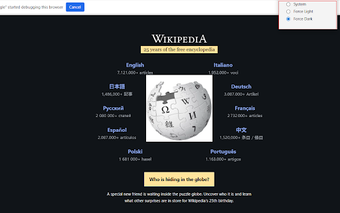
DevTheme Tester is a free Chrome add-on that allows web developers to quickly test Light and Dark mode themes using native CSS media queries. This tool operates through the Chrome DevTools Protocol, providing an accurate representation of how websites respond to color-scheme changes without the interference of Content Security Policies. It offers a straightforward user interface where developers can toggle between 'System Default,' 'Force Light,' and 'Force Dark' modes with a single click, making it an efficient addition to any developer's toolkit.
One of the standout features of DevTheme Tester is its ability to bypass CSP restrictions that often hinder other dark mode extensions. Unlike typical extensions that inject CSS or scripts, DevTheme Tester modifies the rendering engine's behavior directly, ensuring that the native styles are accurately displayed. Additionally, it maintains a privacy-first approach, with no data collection or persistent settings, ensuring a clean testing environment. This open-source tool is perfect for developers looking to streamline their workflow while ensuring high precision in theme testing.